Showing posts with label simulation. Show all posts

Feb 25, 2007

Tips : How to scale your simulation to more nodes eg. > 500 nodes and increase the simulation speed


One of the biggest problem for the implementation of the Packet data structure of NS2 is that it does not math the realities. The packet in ns2 simulation keeps all packet headers for any protocols implemented in NS2. For example, a DSR routing packet may keep DSDV, AODV, or even a PING application header. For this reason, till today, a packet used in ns2 simulation, would have a header size around 40~64KB. And NO packet would be deleted to release the memory it holds until the end of the simulation.

So for a typical simulation with 100 nodes in ns2 around 1M packets exchanged (of course, you may reuse the packets already being freed through Packet::free(Packet*). To learn the implementation of it, please check file common/packet{.h,.cc} ), you may hold 10% of it, 100K packets, and you may use a memory at least 100K*64KB -> 6.4GB, which definitely would crash your computer even server computers.

SO what is the best way to scale the simulation and increase the simulation speed. Fortunately there are two ways :

1. Suggested by ns2 manual, putting the below codes in your tcl script
remove-all-packet-headers
add-packet-header DSR ARP LL MAC CBR IP

to simulation a CBR application on UDP with DSR as routing protocol in a wireless ad hoc network (OOPS!, UDP is not a header. This method is effective, but it requires you to understand most packets header you need.

2. Another way is my way, changing the tcl library for the packet headers. You may find the tcl library file for packet headers in ns2/tcl/lib/ns-packet.tcl, you may find a procedure starting as foreach prot . You can comment out all the headers you don't recognize, like all the Routing protocols you dont know, all Routers, all Multicast, all Transport Protocols except you need, all application layer protocols, some of the Wireless, some of the Mobility, Ad-Hoc Networks, Sensor Nets and all the Other. Finally, you may just have all the below left

foreach prot {
# Common:
Common
Flags
IP
# Transport Protocols
TCP
# Wireless
ARP
LL
Mac
# Mobility
AODV
} {
add-packet-header $prot
}

Here is a sample of the skeleton of the script for you to put your code for your own packet header.

Typically, after this way, you may just have a packet size as 256B. So even you have 500 nodes, and 10M packets need to be exchanged during the simulation. You just need 256MB (if 10% packets held) for it, which is lower than any common configuration of current PCs.

tags: , , , , , , ,

Mar 16, 2006

Exercise - Simulate Ad Hoc Network

General

The objective of this assignment is to get familiar with the network simulator tool (ns-2) and mobile wireless network environment. This study about ad hoc wireless network will be carried out by simulations using the ns-2 tool.
These simulations will be run using Sun workstations of the Birdland (Lintula). The results of the work will be reported in writing.

In this document there are first some are conceptual definitions, instructions for simulations, reporting, grading and returning the report. In the end of this document there are some facts related to implementation details and tips for those who find the required scripting problematic.

Using ns-2

"Ns is a discrete event simulator targeted at networking research. Ns provides
substantial support for simulation of TCP, routing, and multicast protocols over wired and wireless (local and satellite) networks." (http://www.isi.edu/nsnam/ns, 18.6.2004) ns-2 is an interpreter of OTcl language, which includes objects for simulating networks. Those objects are implemented using C++, but OTcl is an interface that can be used for calling methods of the objects.


The network topology, transmission and application agents
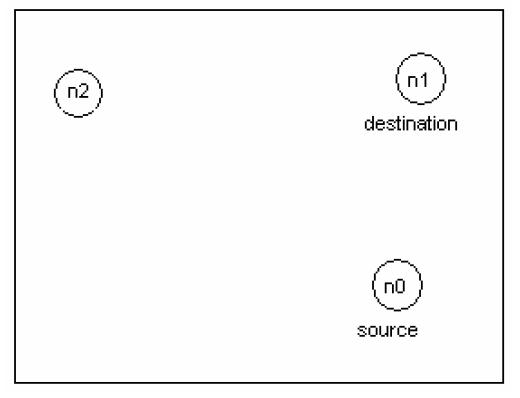
In the picture every circle represents a wireless mobile node. The network consists of TCP source node (n0) and destination node (n1) over an area size of 500m x 500m. Node (n0)uses Agent/TCP/Reno as the sending TCP agent and FTP traffic source. Node (n1) is the receivers of FTP transfers, and it uses Agent/TCPSink as its TCP-agent for the connection establishment.

The routing protocol used for the simulation scenario is ad hoc routing protocol Destination Sequenced Distance Vector (DSDV) and IEEE 802.11 MAC protocol. The targets of the simulation.

In this simulation you will study, the three different wireless network scenario;

  • TCP connection over two static nodes network.
    The ns-2 script file 2node_script.tcl (http://www.cs.tut.fi/kurssit/TLT-2756/assign.html) for this wireless network is provided. This creates the topology described earlier, runs the simulation for 150 seconds and shows the TCP window size in two static nodes scenario with DSDV routing protocol. Run the script and analyze the output graph for the given scenario.

  • TCP connection over 2-nodes (1 mobile and 1 static) network.
    Use the given script file and change the state of the node (n1) from static to mobile for this second scenario. At time 10 s, node (n1) starts moving towards the point (45, 285) at a speed 5 m/s. The syntax of movement command;

    $ns at
  • TCP connection over 3-nodes (2 mobile and 1 static) network.
    Use the given script file, add the static node (n2) and change the state of the nodes (n0 and n1) from static to mobile for this third scenario.

    At time 10 s, node (n1) starts moving towards the point (45, 285) at a speed 5 m/s.
    At time 25 s, node (n0) starts moving towards the point (250, 125) at a speed 7 m/s.

    Analyze the output graph and plot the TCP bandwidth (Mbps) for the given scenario.

    TCP Bandwidth Calculation

    This experiment shows the bandwidth distribution for the above scenario. First to plot the bandwidth, we need to trace the data corresponding to the events registered at the network into a file. The bandwidth graph can be plot using e.g. the xgraph-program, gnu plot, or you can import the values into Excel or Matlab from the trace file (create one for bw calculation) and use tools to draw the graph.

    Instructions for scripting

    Create a trace file and the procedure for calculating bandwidth. The general form of the procedure for bandwidth calculation in tcl programming is

    proc {} {
    global
    # Bytes received by the traffic sinks
    set bw [$sink set bytes_]
    # calculates the bandwidth (in MBit/s) and writes it to the file puts $ "$now [expr $bw/$time*8/1000000]"
    }

    After the simulation, ns outputs the TCP window size xgraph and writes a trace files named output.tr for xgraph and out.nam automatically launches the nam animator, which is an X-windows based graphical software that animates the traffic based on the traces in the out.nam file.

    Similarly, the bandwidth graph can be plot using e.g. the xgraph-program, gnu plot, or you can import the values into Excel or Matlab from the trace file (create one for bw calculation) and use tools to draw the graph.

    Reporting

    Write a compact (1-2 pages) description of the scenarios based on ad hoc network. In that you may use the text, images and formulas of these instructions. Next you should present the graph describing the behavior of TCP window size for different networks and the TCP bandwidth distribution for the third scenario. The results must be analyzed compared and commented.

  • Feb 27, 2006

    Tic-toc simulation

    Exercise today is to design a simple tic-toc simulation which based on the Tic-Toc simulation from OMNET++. Design 2 simple nodes and sending messages to each other within a certain time frame.

    Jan 27, 2006

    Exercise 4 - Simulation of a M/D/1 queue

    Consider a simple network composed of only two nodes (S and D), and one link connecting them. The link connecting the two nodes has a speed of 1Mbps, a propagation delay of 100 ms, and a DropTail buffer at its input of very large size.

    $ns duplex-link $S $D 1Mb 100ms DropTail
    $ns queue-limit $S $D 10000


    We run on node S a Poisson source of traffic. The destination of the packets being node D. Let lamda be the intensity of the Poisson traffic in terms of packets/s. Take lamda = 1200 packets/s and set the packet size of the Poisson source to a fixed value 100 bytes.

    Write the code of a simulation of this scenario, then run the simulation for 1000 seconds. The Poisson source can be created as follows:

    set udp [new Agent/UDP]
    $ns attach-agent $S $udp
    set null [new Agent/Null]
    $ns attach-agent $D $null
    $ns connect $udp $null
    set poisson [new Application/Traffic/Poisson]
    $poisson attach-agent $udp
    $ns at 0 "$poisson start"


    Don’t forget the ns run !

    Verify the load of the queue. What is the expected load? You get the load from the simulation by computing the total number of packets that leave the queue, then by dividing it by the total number of packets that would leave the queue if the link was busy all time. Use the queue monitor object to obtain the total number of packets that leave the queue.

    set monitor [$ns monitor-queue $S $D stdout]

    We focus on the computation of the average queue length. Compute theoretically this average value. Recall that the average queue length in a M/G/1 queue is equal to


    This average queue length includes the packet in the server (physically, the packet being transmitted). The Queue-Monitor object gives the number of packets waiting in the queue, without counting the packet in the server. You will notice that there is a difference P between the theoretical value and the measured value. P is the average number of packets occupying the server of the queue.

    Now validate this average value using your simulation. You need to write a function that samples the queue length many times during the simulation, then you compute the average over all the samples you obtain.

    proc queueLength {sum number}{
    global ns monitor
    set time 0.1
    set len [$monitor set pkts_]
    set now [$ns now]
    set sum [expr $sum+$len]
    set number [expr $number+1]
    puts "[expr 1.0*$sum/$number]"
    $ns at [expr $now+$time] "queueLength $sum $number"}
    $ns at 0 "queueLength 0 0"


    As a final exercise on this scenario, write in a file the queue size in packets (on two columns, the first one for time, the second one for queue size), and plot this queue size versus time using gnuplot.

    *** for generation of random inter-arrival time and packet sizes

    such example can be used :

    set lambda 30.0
    set mu 33.0
    set InterArrivalTime [new RandomVariable/Exponential]
    $InterArrivalTime set avg_ [expr 1/$lambda]
    set pktSize [new RandomVariable/Exponential]
    $pktSize set avg_ [expr 100000.0/(8*$mu)]

    Jan 25, 2006

    Exercise 2 : Multicast

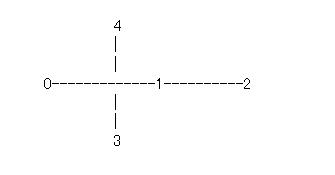
    Create a network which looks like the following:


    All links are 1 Mbps, 5 ms delay.

    Choose DM (instead of CtrMcast) as the multicast routing protocol for the experiment. Node 0 is a UDP source for group 0 and node 2 is the source for group 1. The sources will start transmission at time 0.05. Nodes 3 and 4 will join the multicast group0 at times 0.10 and 0.12, respectively. Node 3 will leave the multicast group at 0.5, and then join group1 at 0.6. The execution will terminate at 0.8 sec.

    Answer :

    Tcl script :

    set ns [new Simulator -multicast on]

    # Dense Mode Multicast Protocol
    set mproto DM
    set mrthandle [$ns mrtproto $mproto {}]

    # allocate a multicast address;
    set group0 [Node allocaddr]
    set group1 [Node allocaddr]

    # Open nam tracefile
    set nf [open prob1.nam w]

    # Open tracefile
    set nt [open trace.tr w]

    $ns namtrace-all $nf
    $ns trace-all $nt

    $ns color 1 red
    # the nam colors for the prune packets
    $ns color 30 purple
    # the nam colors for the graft packets
    $ns color 31 green

    #Define a 'finish' procedure
    proc finish {} {
    global ns nf nt
    $ns flush-trace
    close $nf
    close $nt
    puts "running nam..."
    exec nam -a prob1.nam &
    exit 0
    }

    # create 5 nodes
    puts "create 5 nodes now....."

    set n1 [$ns node]
    set n2 [$ns node]
    set n3 [$ns node]
    set n4 [$ns node]
    set n5 [$ns node]

    puts "create connections now....."

    # Create connection
    $ns duplex-link $n1 $n2 1Mb 5ms DropTail
    $ns duplex-link $n2 $n3 1Mb 5ms DropTail
    $ns duplex-link $n3 $n4 1Mb 5ms DropTail
    $ns duplex-link $n2 $n4 1Mb 5ms DropTail
    $ns duplex-link $n2 $n5 1Mb 5ms DropTail

    # Node orientation
    $ns duplex-link-op $n1 $n2 orient right
    $ns duplex-link-op $n2 $n3 orient right
    $ns duplex-link-op $n3 $n4 orient right
    $ns duplex-link-op $n2 $n4 orient down
    $ns duplex-link-op $n2 $n5 orient up

    puts "Create agents and attach to appropriate nodes..."

    # Create agents and attach to appropriate nodes
    set udp0 [new Agent/UDP]
    $ns attach-agent $n1 $udp0
    $udp0 set dst_addr_ $group0
    $udp0 set dst_port_ 0
    set cbr0 [new Application/Traffic/CBR]
    $cbr0 attach-agent $udp0

    set udp1 [new Agent/UDP]
    $ns attach-agent $n3 $udp1
    $udp1 set dst_addr_ $group1
    $udp1 set dst_port_ 1
    set cbr1 [new Application/Traffic/CBR]
    $cbr1 attach-agent $udp1

    puts "schedule transmitting packets..."
    # create receiver agents
    set rcvr0 [new Agent/LossMonitor]
    set rcvr1 [new Agent/LossMonitor]

    $ns attach-agent $n4 $rcvr0
    $ns attach-agent $n5 $rcvr1

    # joining and leaving the group;
    $ns at 0.10 "$n4 join-group $rcvr0 $group0"
    $ns at 0.12 "$n5 join-group $rcvr1 $group0"
    $ns at 0.50 "$n4 leave-group $rcvr0 $group0"
    $ns at 0.60 "$n4 join-group $rcvr0 $group1"

    $ns at 0.05 "$cbr0 start"
    $ns at 0.05 "$cbr1 start"
    $ns at 0.80 "finish"
    $ns run


    ** Problem :

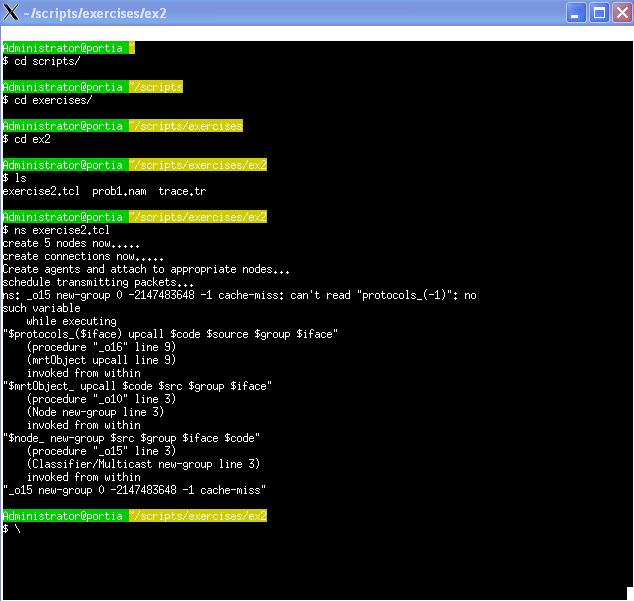
    Unfortunately I ran into problem..still configuring what's wrong with the script :-( everything looks ok to me.. need to do some debugging!


    Error :

    ns: _o15 new-group 0 -2147483648 -1 cache-miss: can't read "protocols_(-1)": no
    such variable
    while executing
    "$protocols_($iface) upcall $code $source $group $iface"
    (procedure "_o16" line 9)
    (mrtObject upcall line 9)
    invoked from within
    "$mrtObject_ upcall $code $src $group $iface"
    (procedure "_o10" line 3)
    (Node new-group line 3)
    invoked from within
    "$node_ new-group $src $group $iface $code"
    (procedure "_o15" line 3)
    (Classifier/Multicast new-group line 3)
    invoked from within
    "_o15 new-group 0 -2147483648 -1 cache-miss"


    Exercise 1

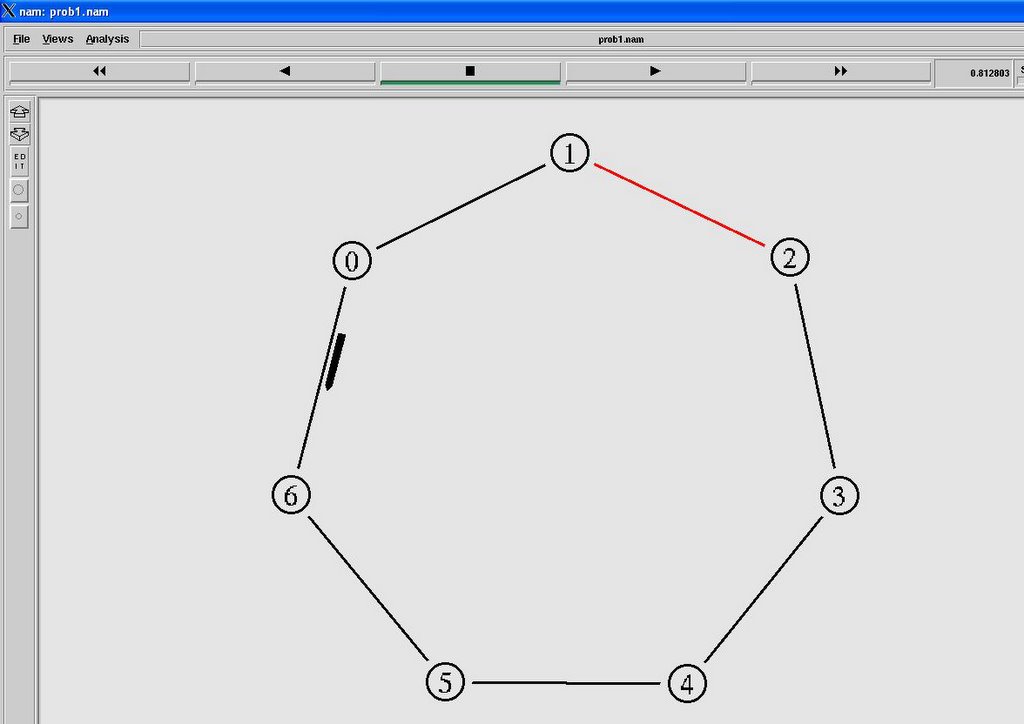
    Write a Tcl script that forms a network consisting of 7 nodes, numbered from 1 to 7, forming a ring topology. The links have a 512Kbps bandwidth with 5ms delay. Set the routing protocol to DV (Distance vector). Send UDP packets from node 1 to node 4 with the rate of 100 packets/sec (using default packet size). Start transmission at 0.01. Bring down the link between node 2 and node 3 at 0.4. Finish the transmission at 1.000. Then run nam to view the results. Answer the following:


    a. What path does the packets follow initially? and why?

    b. What path does the packets take after the link fails? and why?

    Answer :
    Tcl script :
    set ns [new Simulator]

    # Set routing protocol
    $ns rtproto DV

    # Open nam tracefile
    set nf [open prob1.nam w]

    # Open tracefile
    set nt [open trace.tr w]

    $ns namtrace-all $nf
    $ns trace-all $nt

    #Define a 'finish' procedure
    proc finish {} {
    global ns nf nt
    $ns flush-trace
    close $nf
    close $nt
    exec nam -a prob1.nam &
    exit 0
    }

    # create 7 nodes
    puts "create 7 nodes now....."

    set n1 [$ns node]
    set n2 [$ns node]
    set n3 [$ns node]
    set n4 [$ns node]
    set n5 [$ns node]
    set n6 [$ns node]
    set n7 [$ns node]

    puts "create connections now....."

    # Create connection
    $ns duplex-link $n1 $n2 0.512Mb 5ms DropTail
    $ns duplex-link $n2 $n3 0.512Mb 5ms DropTail
    $ns duplex-link $n3 $n4 0.512Mb 5ms DropTail
    $ns duplex-link $n4 $n5 0.512Mb 5ms DropTail
    $ns duplex-link $n5 $n6 0.512Mb 5ms DropTail
    $ns duplex-link $n6 $n7 0.512Mb 5ms DropTail
    $ns duplex-link $n7 $n1 0.512Mb 5ms DropTail

    puts "Create agents and attach to appropriate nodes..."
    ...
    ...
    ...

    puts "schedule transmitting packets..."
    #schedule transmitting packets
    $ns at 0.01 "$cbr start"
    puts "link down node2 and node3............"
    $ns rtmodel-at 0.40 down $n2 $n3
    $ns at 1.00 "finish"
    $ns run


    Question a:
    Intially the shortest path was chosen as according to Distance Vector, DV routing. The distance-vector routing is a type of algorithm used by routing protocols to discover routes on an interconnected network. The primary distance-vector routing algorithm is the Bellman-Ford algorithm. Distance-vector routing refers to a method for exchanging route information. A router will advertise a route as a vector of direction and distance. Direction refers to a port that leads to the next router along the path to the destination, and distance is a metric that indicates the number of hops to the destination, although it may also be an arbitrary value that gives one route precedence over another. Internetwork routers exchange this vector information and build route lookup tables from it.

    Question b.
    When the path failed, the packets will take the alternate route to the destination as the current shortest path is longer able to be used. The alternate path has been detected during the initialization of DV routing.